

Create a subscription (new subscriber)
For a customer subscribing and paying at the same time, one call does both: create a payment session
with tokenize: true, and Truemed charges the first order while provisioning a reusable token for the
ones after it.
The customer has to be present for this. Qualifying and entering an HSA/FSA card both happen on Truemed’s hosted pages, so there’s no way to provision a token in the background.
What you’ll build
Create the session
This is a normal create_payment_session call with tokenize: true added. All amounts are integers
in cents—4200 is $42.00.
The response is the same as any payment session:
Store the id against your subscription record. It identifies the first charge, and it comes back as
payment_session_id on the payment_token_updated webhook—that’s how you match the token to the
right customer.
payment_token and tokenize are mutually exclusive. Use tokenize: true to create a token; pass
payment_token to charge an existing one. Sending both is rejected.
Send metadata if you want your own subscription or customer reference echoed back. It appears on
both webhooks.
How the flow works
Redirect the customer to Truemed
Send them to the redirect_url. They complete the health survey, see the items they’re
subscribing to, and enter their HSA/FSA card.
Return the customer to your site
Truemed redirects to your success_url. Show an order-received or subscription-confirmed message.
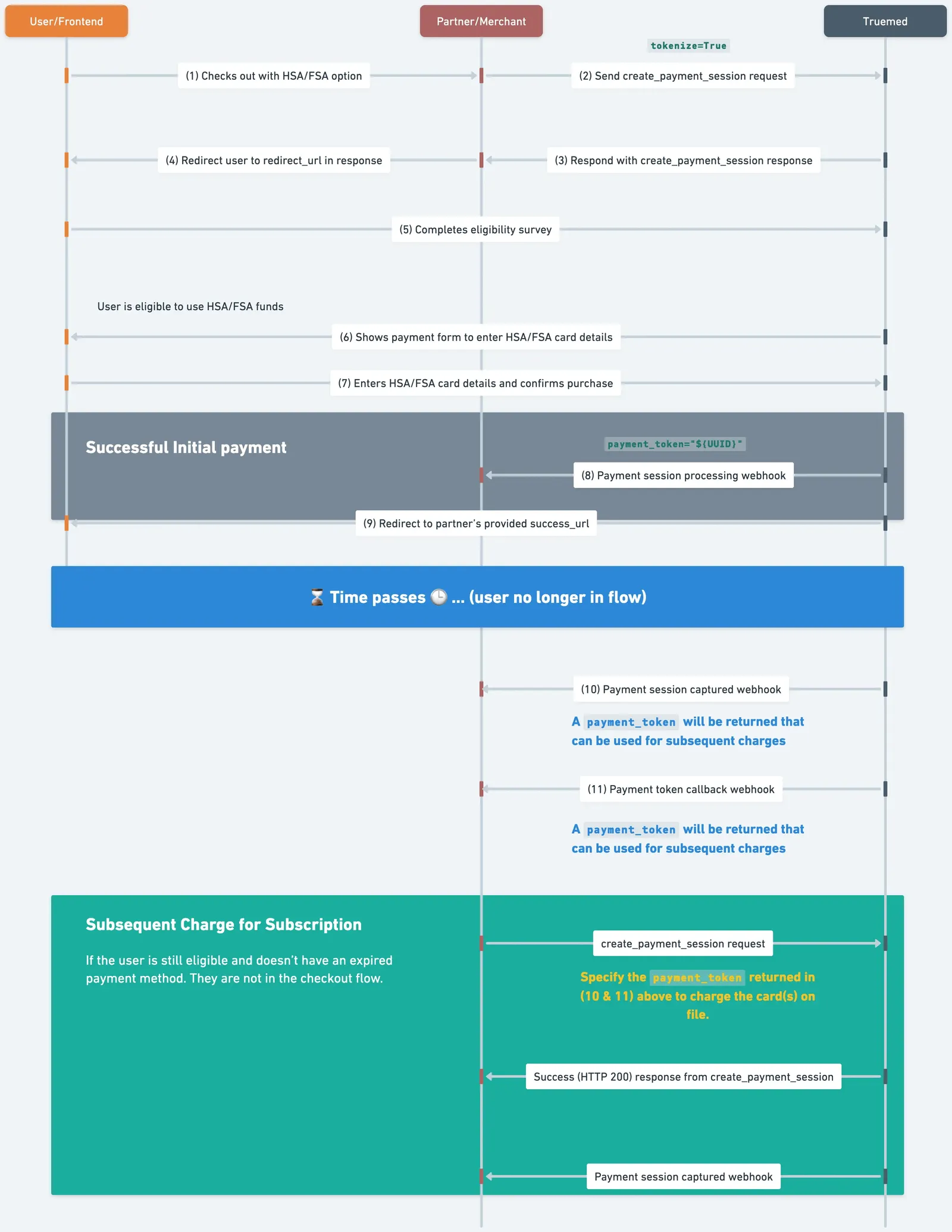
Redirect the customer
Send the customer to the redirect_url from the response. Truemed shows them the items they’re
subscribing to, runs the health survey, and collects card details.
The customer is only sent to your failure_url if they click Cancel on Truemed’s survey or
checkout pages. Everything else—including not qualifying—comes back through the webhooks.
Want customers to stay on your site instead of redirecting away? The same flow renders inline—there’s
no redirect at this step, and you receive a postMessage with the same destination instead. See
Embedded Checkout.
Handle the two webhooks
Both fire after the customer is gone. They’re independent, and one can arrive without the other.
Because you sent tokenize: true, the payment_session_complete payload carries the
payment_token alongside the payment result. Here’s a captured event:
A payment token is {environment}_token_{uuid}—tm_token_... in production and
dev_tm_token_... in sandbox. The payment_token field only appears when you created the session
with tokenize: true or passed an existing payment_token.
payment_token is present on every payment_session_complete event for a tokenized session, not
just captured—including processing, before the LMN is verified. Seeing the field is not the same
as the token being chargeable. Wait for payment_token_updated.
Do not create fulfillment requests, ship anything, or start a free trial until
payment_session_complete reports status: captured. A customer reaching your success_url only
means they finished checkout, not that the payment cleared.
The first charge follows the same status path as any Truemed payment, including the case where the
customer completes the survey but no LMN is issued—the session moves to rejected and you should tell
the customer the order won’t be fulfilled. See
Payment Lifecycle for every status, and
Manual and Delayed Capture if you
authorize now and capture later. The rule doesn’t change in either case: no fulfillment before
captured.
If no LMN is issued, payment_token_updated never fires—no token was provisioned. Don’t hold the
subscription open waiting for it.
Free trials
To start a subscription with no charge up front, three fields are required together:
Truemed shows the customer the next bill amount and date from display_next_bill_info when they enter
their payment details, so they know what they’re agreeing to.
display_next_bill_info is only valid when total_amount is 0. Sending it with a non-zero amount is
rejected, and a zero-amount session without it is rejected with a 400—Amount cannot be 0.
A free trial still produces a payment_session_complete webhook, and you still wait for
status: captured before starting the trial—it confirms the payment method was stored successfully.