

Token lifecycle
A payment token is either chargeable or blocked on something the customer has to do. When it’s blocked, Truemed tells you which action is needed and where to send the customer. Your job is to relay that action and wait for the token to come back.
This page is the reference for every way a token can stop working and how to recover it. For the happy path, see Recurring Charges.
Token states
These state names are a model for reasoning about tokens, not values returned by the API. There is no
status field on a payment token—you infer the state from your charge results and the
payment_token_updated webhook.
How a charge maps to token state
One table for the whole picture: what you get back from
create_payment_session when charging a
token, and what it tells you about the token.
SessionPending is not permanent—it means the token exists but the initial payment hasn’t been
captured, so there’s no payment method to charge yet. Retry the charge once payment_token_updated
arrives.
A 200 means the charge was accepted for processing—it does not mean funds are secured. Fulfill only
after the payment_session_complete webhook reports status: captured, exactly as with a one-time
payment. See Payment Lifecycle.
The 422 response
The body of a 422 is the same shape as a successful create_payment_session response, with
next_action and redirect_url populated:
Read next_action to decide what to tell the customer, and redirect_url to decide where to send
them. Store the id—it’s the payment session that failed, and it comes back to you as
failed_payment_session_id when the customer resolves the block.
Why a charge fails
Two next_action values cover every recoverable failure.
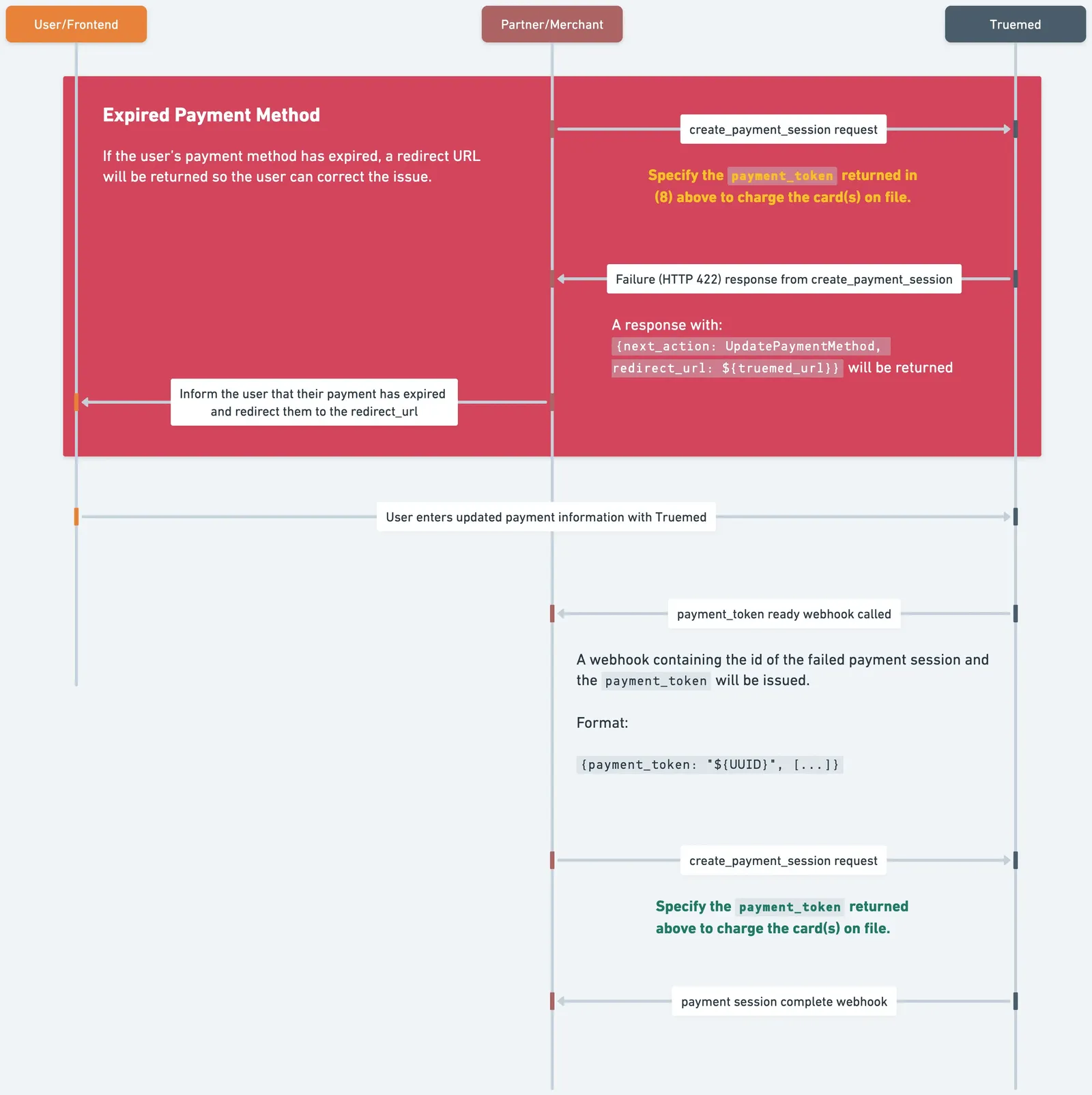
UpdatePaymentMethod
The customer’s card can no longer cover the charge.
Common causes
- The HSA/FSA card on file has expired.
- The card was declined.
- The cart contains ineligible items and there’s no credit or debit card on file to cover them.
What the customer must do. Visit the redirect_url and enter current card details. If the charge
failed because of ineligible items, they’ll be asked for a regular credit or debit card as a backup
alongside their HSA/FSA card.
Suggested message. “Your payment method needs updating to keep your subscription active.”
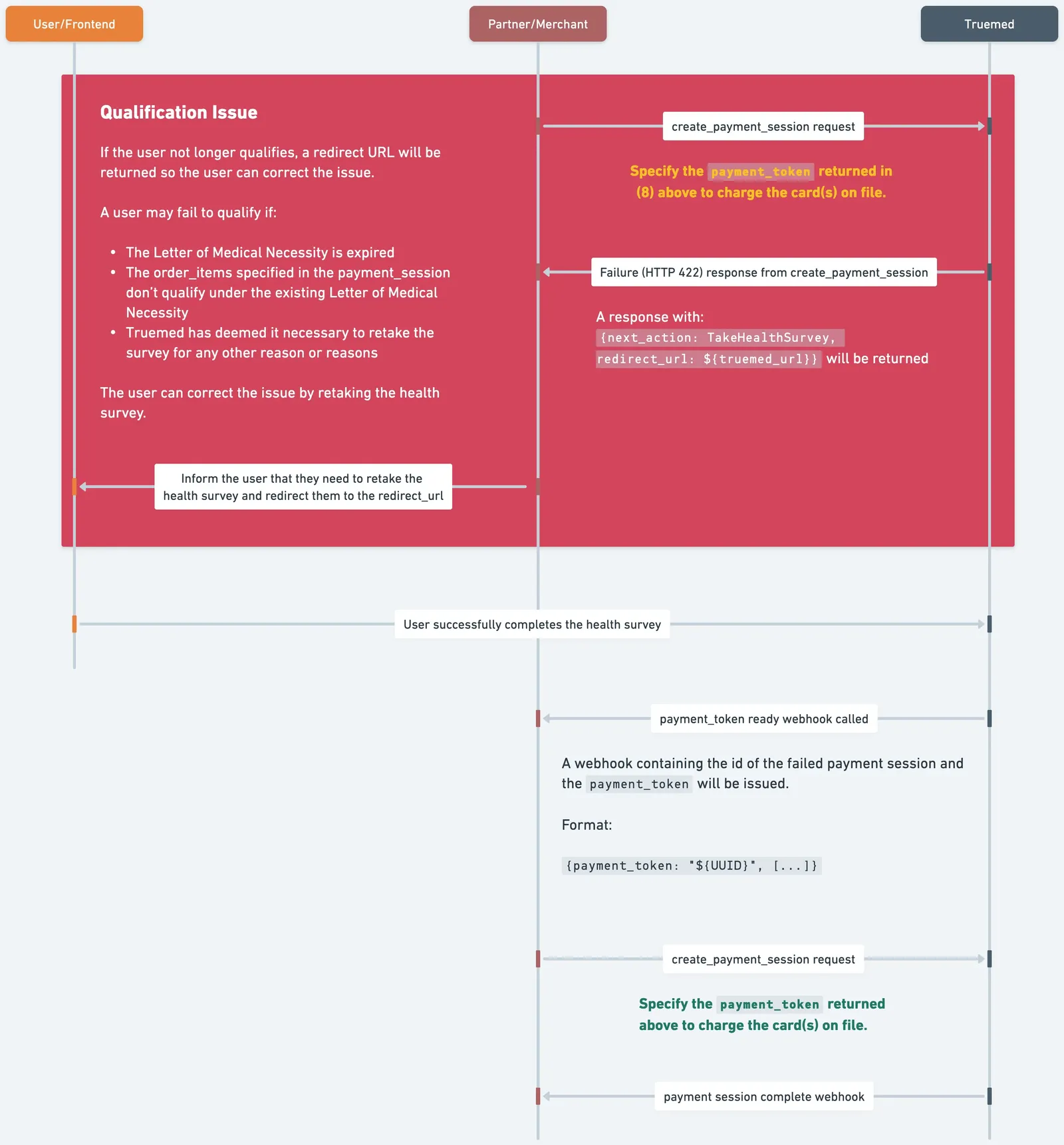
TakeHealthSurvey
The customer’s Letter of Medical Necessity no longer covers what they’re buying.
Common causes
- The items in the subscription changed and fall outside the existing LMN.
- The existing LMN has expired.
- Truemed has determined the customer needs to retake the survey for another reason.
What the customer must do. Visit the redirect_url and complete the health survey again. A new
LMN is issued if they still qualify.
Suggested message. “Requalify with Truemed to keep using your HSA/FSA funds.”
What to tell the customer
Truemed doesn’t email your customers—you do. Adapt this copy to your voice; it’s a starting point, not a requirement.
Include the redirect_url as the call to action in both cases. The link is specific to this customer
and this failure—don’t reuse one across customers.
Recover the subscription
The charge returns 422
Read next_action and redirect_url from the response body, and store the id of the failed
payment session.
Send the customer to the redirect_url
Either inline or by email, depending on whether they’re on your site—see below.
The customer resolves the block
They update their card or retake the survey on Truemed’s hosted pages.
Retrying the charge before payment_token_updated arrives returns the same 422. The webhook is the
signal that the customer’s action actually landed.
A customer can also resolve a block without ever touching your app—for instance by following a link
from an older email. Treat payment_token_updated as a stand-down signal: when it arrives, clear any
banner, dashboard warning, or scheduled reminder you raised for that token. Otherwise you’ll keep
chasing customers who already fixed the problem.
If the customer is on your site
Surface the redirect_url immediately, inside the flow they’re already in. This applies when the
charge was triggered by something the customer just did—changing their plan, adding an item, or
checking out. Send them straight to Truemed and bring them back to your success_url.
This is also the right path for a subscription-management dashboard. See Update an active subscription for generating an update link on demand rather than waiting for a charge to fail.
If the customer is not on your site
This is the recurring-charge case, and the one most integrations need to get right: the charge runs on your billing schedule, so by definition the customer isn’t present.
- Email the
redirect_url, usingnext_actionto pick the message. - Don’t re-drive the charge on a timer. Wait for
payment_token_updated, then charge. - If you retry on a schedule anyway, expect the same
422every time until the customer acts.
Most of these failures are avoidable. See Prevent failures before they happen for the monitoring job that catches expiring cards and LMNs before a charge breaks.
When no webhook ever arrives
Provisioning a token can fail silently from your side: you call create_payment_session with
tokenize: true, the customer is redirected, and no payment_token_updated ever comes.
That means one of:
- The customer abandoned the health survey.
- The customer never entered card details.
- The customer didn’t qualify for the items in their cart, so no LMN was issued.
This isn’t specific to subscriptions—the same thing happens with any payment session where the customer doesn’t finish. Don’t hold a subscription open indefinitely waiting for the webhook. Time it out and prompt the customer to start over.