

Product page widget
The product page (PDP) widget is the highest-impact promotion you can add. It tells customers a product may qualify for HSA/FSA spending at the moment they’re deciding whether to buy.
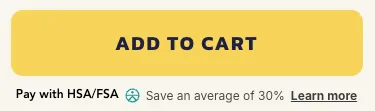
Install it after you’ve activated the payment app. See the setup guide if you haven’t done that yet.
Installation
- Get your Public Qualification ID. In the Truemed dashboard, click My Account in the top right, select Settings, and open the Public ID tab to view and copy it
- In Shopify, go to Online Store > Themes > Customize
- Open your product page template
- Add a Custom Liquid block where you want the widget, typically near the price or the “Add to Cart” button
- Paste the following, replacing
YOUR_PUBLIC_QUALIFICATION_ID:
The Truemed payment app works with all Shopify themes, and changing your theme will not affect the payment integration. If you switch themes, you may need to re-add this widget to your new template.
Dark mode
For pages with dark backgrounds, add the dark-mode attribute:
Show the widget only on eligible products
Use Shopify product tags to control where the widget appears:
- Tag products as
truemed-eligibleand addshopify-tags="display-if-eligible"to the div - Or tag ineligible products as
truemed-ineligibleand addshopify-tags="display-unless-ineligible"
Tags are yours to maintain, so they can drift from the eligibility Truemed assigns. Check the Products tab of your Truemed dashboard for the current status of any product. See Eligibility for how categories are determined.
If you’re tagging by hand today, Truemed also writes each variant’s eligibility status directly to your store, which you can use to build a collection that updates itself. See HSA/FSA eligible collections.
Style customizations
Where you put the CSS determines whether it needs <style> tags around it.
Putting the CSS in the same Custom Liquid block as the widget keeps everything together:
Setting font-size or color in the div’s style attribute has no effect on the widget. It renders its own elements with their own font size and color, which win over anything inherited from the containing div. Older versions of this snippet included style="font-size: 14px;" — it was doing nothing, and it’s safe to remove. Use the CSS overrides below instead.
Text size
Target the two text elements directly. !important is required, because the widget ships its own stylesheet.
.truemed-entry-text covers “HSA/FSA eligible” and “Save an average of 30%”. .truemed-entry-link is the “Learn more” button.
To scale the logo alongside the text, use the icon-height attribute on the div. That one does work, since the widget reads it directly:
Font family, weight, and style
The widget loads and applies Inter, so your theme’s font is not picked up automatically. Use inherit to adopt whatever font surrounds the widget:
Or name a font and set weight or style at the same time:
Weights are set per element, so override them individually:
These rules style the line on your product page. The modal that opens when a customer clicks “Learn more” uses Truemed’s own typography and is not affected.
Colors and spacing
Related
- Promotion resources — snippets and best practices for promoting HSA/FSA across your site
- Subscriptions and reimbursement setup — the thank you page widget and post-purchase flow