

Intro to Truemed on Shopify
Welcome to the Truemed family. This page covers how Truemed works on Shopify and what to expect during onboarding.
New to Truemed? Core concepts explains HSA/FSA payments, product eligibility, and the terms used throughout these docs.
How Truemed works on Shopify
The Truemed Payments App is a plug-and-play way to start accepting HSA/FSA payments quickly. Once installed, it adds Truemed as a new payment option in your Shopify checkout, available as an additional payment method. Below is an example of what this gateway looks like at checkout.
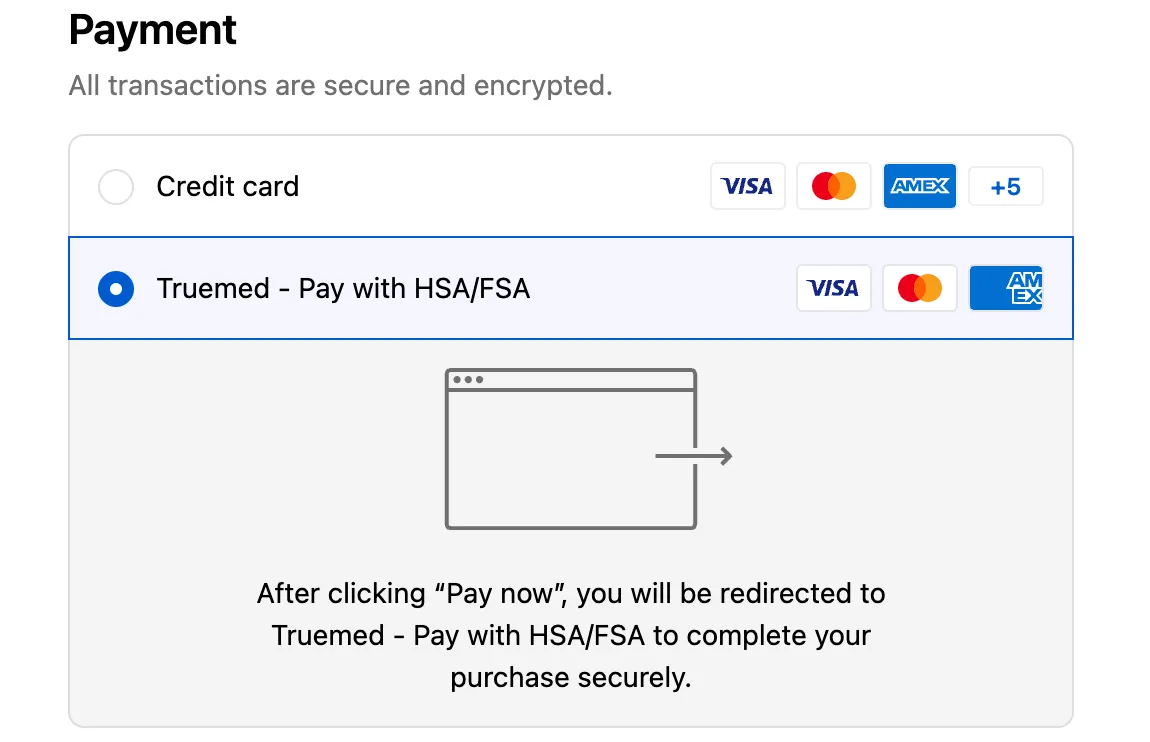
After a customer selects Truemed at checkout, they’ll be redirected to a secure Truemed session to complete the required steps, including a health intake survey if applicable, and payment. Once the session is complete, they’ll be returned to your order confirmation page, just like any other payment method.
Here’s the customer experience at a high level:
- Product page: Customers see an HSA/FSA eligibility widget on your product pages, letting them know they may qualify.
- Checkout: The customer selects “Truemed” as their payment method (they must check out as a guest, not via Shop Pay).
- Health intake: After placing the order, the customer completes a health survey (~2 minutes).
- Provider review: A licensed provider reviews the intake. If eligible, an LMN is issued within 24-48 hours.
- Payment processed: If the customer paid with their HSA/FSA card, they’re all set. If they used a regular card, they receive reimbursement instructions along with their LMN.
Watch the Shopify integration walkthrough video for a step-by-step overview.
What to expect during onboarding
Your onboarding process includes the following key steps:
Key contacts
Next steps
- Shopify setup guide — Prerequisites, installation, activation, and widgets
- Truemed Extensions App — HSA/FSA checkout widgets, catalog sync, and eligibility in your Shopify admin
- Stripe onboarding and payouts — Set up your bank account and Stripe connection
- Eligibility — How Truemed categorizes your catalog
- Financial statuses — Track a Truemed order from checkout through payout
- Customer FAQs — Answers to what your customers will ask